For perfectionist feeds only: Instagram’s new “Edit Grid” lets you rearrange posts and finally fix your profile layout
Instagram’s new Edit Grid feature finally lets you rearrange your posts and restore that perfectly curated profile feed.

For anyone who spends a lot of time on their phone, social media has become part of daily life. Keeping up with friends and discovering new topics on Instagram is likely already part of your routine, which is why every new feature sparks a rush to try it. When Instagram recently made the sweeping shift from its original square layout to a taller format, it prompted plenty of discussion and threw carefully planned profile grids into disarray for users who care about visual cohesion. Now, those frustrated by posts falling out of place on their profiles can finally rearrange them freely.
- Related reading: The UK plans to ban Instagram and TikTok for users under 16: The biggest turning point in the social media era is here
For users who care about maintaining a consistent color palette and visual style across their profile grid, Instagram’s new “Edit Grid” setting is a welcome surprise. Since its launch, it has quickly become a hot topic among Instagram users. If you’d like to use the Edit Grid feature yourself, the steps are very simple.
How to Use Instagram’s “Edit Grid” Feature

Step 2. Long-press the post you want to move.
Step 3. Tap “Edit Grid.”
Step 4. Drag the post directly to your desired position.
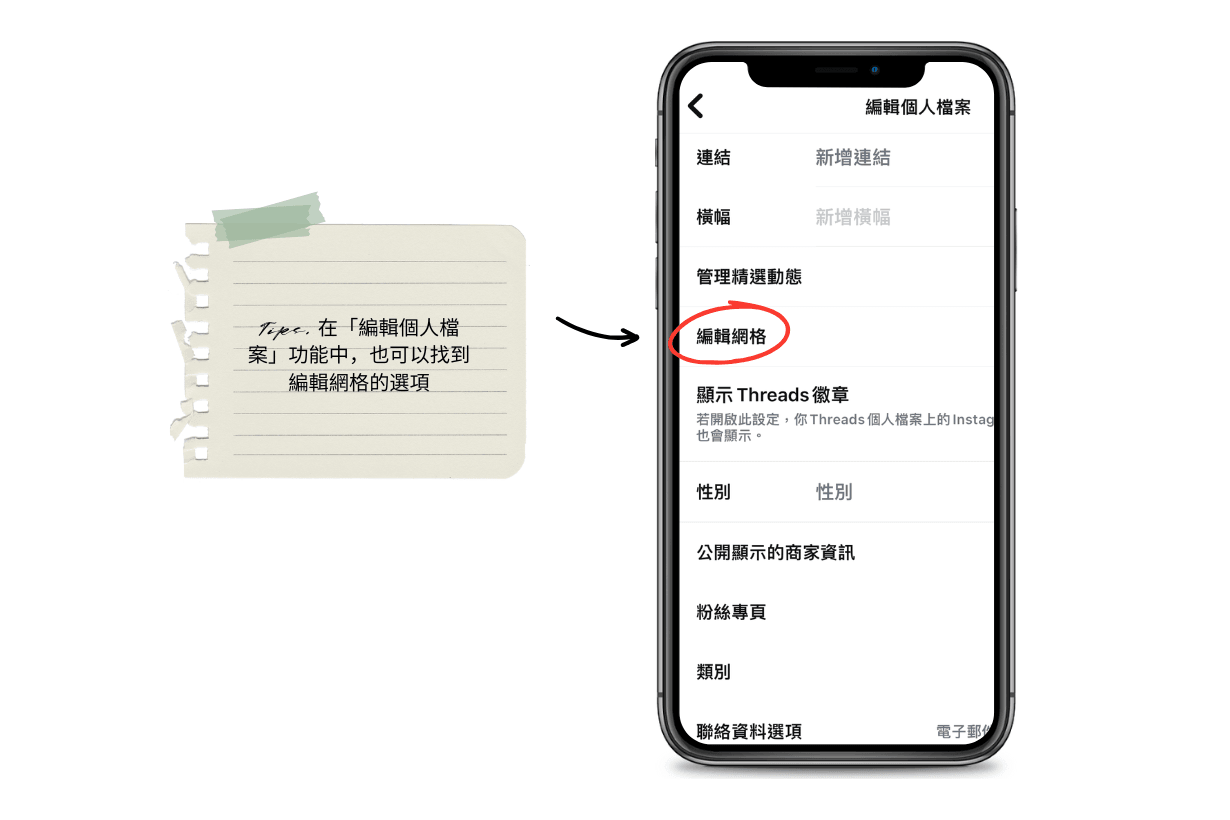
There are two ways to adjust your profile grid. You can follow the steps above and long-press the post you want to move, or go to “Edit Profile” on your profile page and scroll down to find “Edit Grid” above the “Show Threads Badge” option. Tapping it will take you to the same editing page, where you can rearrange your posts as you like. Instagram is still gradually testing and rolling out this new feature, so if you don’t see the setting yet, check whether your Instagram app needs updating or give it a little more time. The feature should roll out to more accounts in the coming days.

Join POPBEE Circle and subscribe to the POPBEE newsletter for the latest updates, plus early access to exclusive perks and special offers. Beyond this story, here are a few recent articles also worth checking out:
- Smells like a freshly made mocha: DedCool’s new scent “Mocha Magic” lets you wear coffee and toffee on your skin
- There’s finally hope for dull, sleep-deprived skin: MALIN+GOETZ’s new Resurfacing Hydrating Gel Mask is a 5-minute rescue you can really feel
- Your work wardrobe can be as glamorous as the 1920s: COS at New York Fashion Week, where sharp tailoring meets fringe and dropped waists!